

TK8 Deposit Guide for Online Payment, DuitNow and Touch ’N Go
TK8 provides several funding options for members who need to add MYR to their gaming account. The supplied deposit screens show Online Payment, DuitNow and Touch ’N Go as available methods, with the exact payment channel, bank list and transaction limit changing according to the selected method or channel. This guide explains how to select the correct option, enter a valid amount, choose an applicable deposit bonus and submit the transaction.
Table of Contents
- 1. TK8 Deposit Methods
- 2. Online Payment Deposit
- 3. DuitNow Deposit
- 4. Touch ’N Go Deposit
- 5. Supported Deposit Channels and Banks
- 6. TK8 Deposit Limits
- 7. TK8 Deposit Bonus Options
- 8. How to Make a TK8 Deposit
- 9. How to Deposit with Online Payment
- 10. How to Deposit with DuitNow
- 11. How to Deposit with Touch ’N Go
- 12. What to Check Before Confirming a Deposit
- 13. What to Do After a Deposit
- 14. TK8 Deposit FAQs
TK8 Deposit Methods
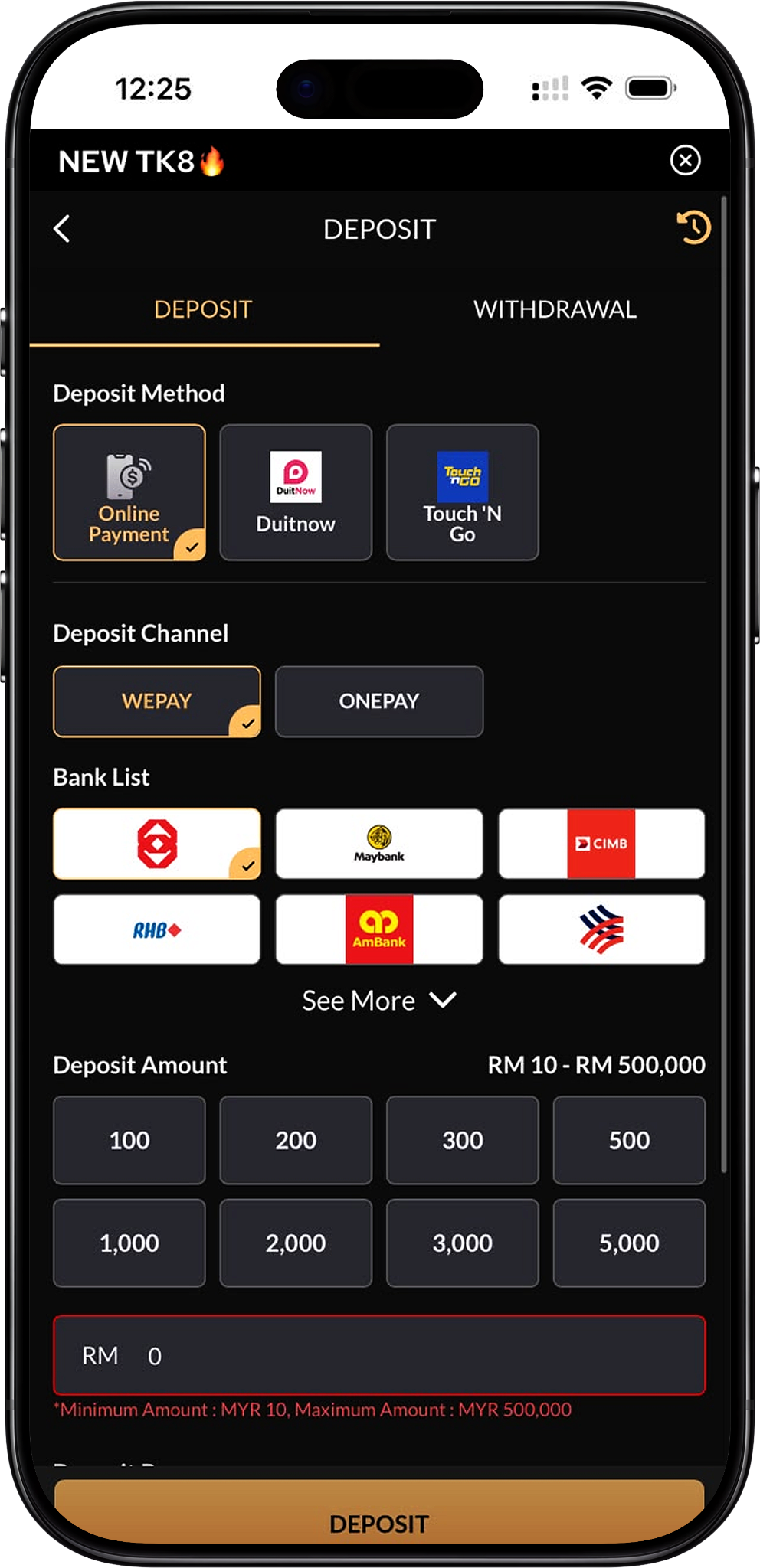
Available Funding Options
The supplied account interface displays three main deposit methods: Online Payment, DuitNow and Touch ’N Go. Members should select the option that matches the payment service they intend to use and then follow the channels and banks displayed for that method.
Payment Availability Can Differ by Method
The available deposit channels and banks are not identical for every payment method. For example, the supplied screens show WEPAY and ONEPAY under certain Online Payment or DuitNow selections, while Touch ’N Go displays its own supported channel. Members should rely on the options currently shown inside their account rather than assuming that every bank or channel is available for every transaction.
Online Payment Deposit
Online Banking Through Supported Channels
Online Payment allows members to choose a displayed deposit channel and then select one of the available banks. The supplied screens show WEPAY and ONEPAY as examples of deposit channels, with supported Malaysian banking options presented underneath the selected channel.
Banks Shown in the Deposit Interface
The supplied screenshots display banking options that include Maybank, CIMB, RHB, AmBank, BSN and other supported bank entries depending on the selected channel. The bank list may change when members switch between WEPAY and ONEPAY or when payment availability is updated.
Use the Current Bank List
Members should choose only a bank that appears inside the active deposit screen. If a preferred bank is not visible, use the available “See More” option where provided or change to another supported deposit channel before continuing.
DuitNow Deposit
DuitNow as a Dedicated Deposit Method
DuitNow appears as a separate funding option in the supplied interface. After selecting DuitNow, members can choose an available channel such as WEPAY or ONEPAY and then select the bank or payment destination displayed for that channel.
DuitNow Deposit Amount Range
The supplied DuitNow examples show a minimum deposit of MYR 10. Depending on the selected channel, the displayed maximum may be MYR 30,000 or MYR 500,000, so members should check the active limit shown on screen before entering an amount.
Touch ’N Go Deposit
Touch ’N Go E-Wallet Funding
Touch ’N Go is displayed as another deposit method. When selected, the supplied interface shows a dedicated deposit channel and Touch ’N Go as the payment destination, allowing members to fund the account using the available e-wallet flow.
Touch ’N Go Deposit Channel
One supplied example displays XXXPAY as the channel used with Touch ’N Go. Channel availability can change, so members should follow the channel currently presented in their account rather than relying on an older screenshot.
Touch ’N Go Deposit Limit
The supplied Touch ’N Go example shows a minimum of MYR 10 and a maximum of MYR 500,000. The current deposit screen remains the authoritative place to confirm the permitted range for a specific transaction.
Supported Deposit Channels and Banks
WEPAY
WEPAY appears as one of the selectable deposit channels in the supplied interface. After selecting it, members are shown the banks currently supported through that route.
ONEPAY
ONEPAY is another deposit channel displayed in the screenshots. Its available bank list and maximum transaction amount can differ from WEPAY, so members should review the options that appear after selecting it.
XXXPAY
XXXPAY appears in the supplied Touch ’N Go deposit example and connects the selected e-wallet funding method with the displayed payment destination.
Bank Availability
The deposit interface can display different Malaysian banking options according to the selected method and channel. Maybank, CIMB, RHB, AmBank and BSN are among the recognizable examples shown in the supplied screens, while additional banks may be available through the expandable list.
TK8 Deposit Limits
Minimum Deposit
The supplied interfaces consistently display MYR 10 as the minimum deposit amount. Members should not submit an amount below the minimum shown on the active deposit screen.
Maximum Deposit
The maximum amount varies by payment route. Some supplied screens show a maximum of MYR 500,000, while other channel combinations show a maximum of MYR 30,000. Always use the limit displayed after choosing the payment method, channel and bank.
Quick Deposit Amounts
Depending on the selected method, the interface provides preset amounts such as RM50, RM100, RM200, RM300, RM500, RM1,000, RM2,000, RM3,000, RM5,000 and RM10,000. Members may also use the amount field to enter a permitted value manually.
TK8 Deposit Bonus Options
SLOTS 100% WELCOME BONUS RM 800*
The deposit screen displays the SLOTS 100% WELCOME BONUS RM 800* (/en/promotion/slots-100-welcome-bonus-rm800, internal link) as a selectable new-member bonus when its minimum deposit and other eligibility requirements are satisfied. The supplied interface indicates a qualifying amount above RM30, while the dedicated promotion terms should be reviewed before claiming it.
LIVE CASINO 50% WELCOME BONUS RM 300*
Members may also see the LIVE CASINO 50% WELCOME BONUS RM 300* (/en/promotion/live-casino-50-welcome-bonus-rm300, internal link). The supplied deposit interface indicates a qualifying amount above RM50, while the dedicated promotion page provides the applicable bonus limit, turnover and eligibility conditions.
Deposit Without a Bonus
Members who do not want a welcome offer can select “Do not participate in any promotions” and proceed without attaching a listed deposit bonus to the transaction. This is useful when a member does not want the additional conditions associated with a promotional offer.
Check Promotions Before Selecting a Bonus
Before choosing an offer at deposit, review Promotion (/en/promotion, internal link) to compare welcome bonuses, daily rebates, reload benefits and VIP-related offers. Selecting a promotion can introduce separate eligibility and turnover requirements.
How to Make a TK8 Deposit
Step 1: Log In to Your Account
Open TK8 Login (/en/login, internal link) and access the account that you want to fund. Deposits should be made only after confirming that you are signed in to the correct member account.
Step 2: Open the Deposit Page
Select Deposit (/en/deposit, internal link) from the member account or wallet area to open the funding interface.
Step 3: Choose a Deposit Method
Select Online Payment, DuitNow or Touch ’N Go according to the payment service you intend to use. The selected method determines which deposit channels and payment destinations appear next.
Step 4: Select a Deposit Channel
Choose one of the channels displayed for the selected method, such as WEPAY, ONEPAY or another currently supported channel. Do not assume that every channel supports the same banks or limits.
Step 5: Select the Bank or Payment Destination
Choose the bank or e-wallet destination displayed under the selected channel. If additional banks are available, use the interface’s “See More” option to review them.
Step 6: Enter the Deposit Amount
Select a preset amount or enter the amount manually. Confirm that it is at least MYR 10 and does not exceed the maximum shown for the active payment route.
Step 7: Choose a Deposit Bonus
Select an eligible welcome bonus if you intend to participate, or choose the no-promotion option if you want to make the deposit without a bonus. Review the conditions through Promotion (/en/promotion, internal link) before making your selection.
Step 8: Press Deposit
Check the method, channel, bank, amount and bonus selection, then press the Deposit button to continue to the applicable payment instructions.
Step 9: Complete the Payment
Follow the payment instructions presented by the selected bank, payment channel or e-wallet. Confirm the amount carefully before authorizing the transaction.
Step 10: Check Your Account Balance
Return to the member account after payment and confirm that the balance reflects the completed transaction. Use the transaction or deposit history where available if you need to verify its status. The main naked URL is https://tk8official.com.my.
How to Deposit with Online Payment
Step 1: Select Online Payment
Open Deposit (/en/deposit, internal link) and choose Online Payment from the available deposit methods.
Step 2: Choose WEPAY or ONEPAY
Select the available payment channel shown in the interface. The screenshots demonstrate both WEPAY and ONEPAY, but the currently available choice may depend on your account and payment availability.
Step 3: Choose Your Bank
Select a supported bank from the displayed list. Available banks can differ according to the selected channel, so use only the bank options shown in the current session.
Step 4: Enter an Eligible Amount
Choose one of the preset amounts or type a custom amount within the displayed minimum and maximum limits.
Step 5: Select or Decline a Bonus
Choose an applicable deposit promotion or select the no-promotion option. Review SLOTS 100% WELCOME BONUS RM 800* (/en/promotion/slots-100-welcome-bonus-rm800, internal link) or LIVE CASINO 50% WELCOME BONUS RM 300* (/en/promotion/live-casino-50-welcome-bonus-rm300, internal link) if either offer is relevant.
Step 6: Submit and Complete Banking Payment
Press Deposit and follow the banking instructions generated by the selected payment route. Return to the account afterward to confirm the transaction status.
How to Deposit with DuitNow
Step 1: Choose DuitNow
From Deposit (/en/deposit, internal link), select DuitNow as the preferred funding method.
Step 2: Select the Available Channel
Choose the displayed WEPAY, ONEPAY or other available DuitNow-compatible channel. The current channel determines the destination and supported transaction range.
Step 3: Select the Displayed Bank
Choose the relevant banking option presented under the selected channel. The bank list may change when another channel is selected.
Step 4: Confirm the Deposit Limit
Check the minimum and maximum amount displayed in the interface. The supplied examples show MYR 10 as the minimum, while maximum limits vary between MYR 30,000 and MYR 500,000.
Step 5: Enter the Amount and Bonus Choice
Enter an eligible amount and select a bonus only if you meet its requirements. Otherwise, choose “Do not participate in any promotions.”
Step 6: Submit the DuitNow Deposit
Press Deposit and complete the DuitNow payment according to the instructions displayed during the transaction.
How to Deposit with Touch ’N Go
Step 1: Select Touch ’N Go
Open Deposit (/en/deposit, internal link) and choose Touch ’N Go from the available payment methods.
Step 2: Select the Available Payment Channel
Use the channel displayed for Touch ’N Go. The supplied example shows XXXPAY, although the active channel may change over time.
Step 3: Confirm the Touch ’N Go Destination
Verify that Touch ’N Go is displayed as the selected payment destination before entering an amount.
Step 4: Enter a Permitted Deposit Amount
The supplied example shows a MYR 10 minimum and MYR 500,000 maximum for the illustrated Touch ’N Go route. Use the current on-screen limits when making an actual transaction.
Step 5: Choose a Promotion or No Bonus
Select an eligible welcome bonus if required, or continue without a bonus by selecting the no-promotion option.
Step 6: Submit and Complete the Wallet Payment
Press Deposit and follow the instructions provided for the Touch ’N Go payment. Confirm the transaction amount before approving it in the relevant payment flow.
What to Check Before Confirming a Deposit
Confirm the Payment Method
Make sure Online Payment, DuitNow or Touch ’N Go matches the funding route you actually want to use. Changing the method can also change available channels, banks and limits.
Confirm the Selected Channel and Bank
Verify the highlighted channel and bank or payment destination before submitting. This reduces the risk of following instructions intended for a different payment route.
Confirm the Amount Limits
Check the active minimum and maximum. Although MYR 10 appears as the minimum in the supplied screens, the maximum varies between payment routes and should always be checked at the time of deposit.
Confirm the Bonus Selection
A welcome bonus can carry turnover, game-category and eligibility requirements. Read the applicable promotion details before selecting it, or use the no-promotion option when you do not want a bonus attached to the deposit.
Confirm Account and Payment Details
Ensure that you are using the correct member account and follow the payment information generated for that transaction. Avoid reusing outdated payment instructions from an earlier deposit.
What to Do After a Deposit
Check the Updated Balance
After completing the payment, return to the account and verify the updated balance before starting any gaming activity.
Check the Applied Bonus
If you selected a bonus, verify that the applicable promotional credit or status has been applied according to its terms. Review Promotion (/en/promotion, internal link) if the conditions need to be checked again.
Explore Available Games
Once the account is funded, members can browse Games (/en/games, internal link), including Slot (/en/games/slot, internal link), Live Casino (/en/games/live-casino, internal link), Sports (/en/games/sports, internal link), Fishing (/en/games/fishing, internal link), Card Game (/en/games/card-game, internal link), Esports (/en/games/esports, internal link), Cockfight (/en/games/cockfight, internal link) and Instant Win (/en/games/instant-win, internal link).
Review Rebate Information
Members who plan to participate in eligible games can also review Rebate (/en/rebate, internal link) to understand the displayed Slots and Live Casino daily rebate arrangements separately from deposit bonuses.
Review Withdrawal Requirements
Before requesting a cash-out later, check Withdrawal (/en/withdrawal, internal link) for the applicable withdrawal process and any requirements associated with account activity or selected promotions.
TK8 Deposit FAQs
What deposit methods are available?
The supplied interface displays Online Payment, DuitNow and Touch ’N Go. Available options can change, so the current deposit screen should be used as the final reference.
What is the minimum deposit?
The supplied screenshots show a minimum deposit of MYR 10 across the illustrated payment routes.
What is the maximum deposit?
It depends on the payment method and channel. The supplied examples show maximum limits of MYR 30,000 or MYR 500,000.
Why does the maximum amount change?
Different payment channels can use different transaction limits. Switching between methods such as Online Payment, DuitNow or Touch ’N Go can therefore change the displayed maximum.
Which deposit channels are shown?
WEPAY, ONEPAY and XXXPAY are among the channel names visible in the supplied screenshots. Their availability depends on the selected payment route.
Which banks can I use?
The supplied screens show examples including Maybank, CIMB, RHB, AmBank and BSN, together with other supported banking entries. The actual list depends on the selected channel.
Can I use Touch ’N Go?
Yes. Touch ’N Go appears as a dedicated deposit method in the supplied interface and uses its own displayed payment channel.
Can I use DuitNow?
Yes. DuitNow appears as a dedicated deposit method with supported channels and payment destinations displayed after selection.
Can I deposit without claiming a bonus?
Yes. The supplied interface provides a “Do not participate in any promotions” option that allows members to continue without selecting a deposit bonus.
What welcome bonuses appear on the deposit page?
The supplied interface displays the Slots 100% Welcome Bonus RM 800* and the Live Casino 50% Welcome Bonus RM 300* as selectable offers when their qualifying conditions are met.
Does selecting a bonus affect withdrawal conditions?
A selected promotion can include turnover and eligibility conditions. Review the dedicated promotion terms before participating and check Withdrawal (/en/withdrawal, internal link) before requesting funds later.
What should I do if my preferred bank is not displayed?
Check “See More” where available, switch to another supported deposit channel, or use another displayed payment method. Do not submit payment through an option that is not presented in the active deposit interface.
What should I do if a deposit is not reflected immediately?
First check the account balance and transaction history. Confirm that the payment was completed successfully and that the correct transaction instructions were used. If the status remains unresolved, use the available support channel with the relevant transaction details.
Where can new users create an account before depositing?
New users can review Register (/en/register, internal link) for account creation before accessing member funding functions.
Where can existing members sign in?
Existing members can use Login (/en/login, internal link) before opening the account’s deposit function.
Where can I see other account and gaming information?
Use Home (/en, internal link) for the main platform overview, Games (/en/games, internal link) for available gaming categories, and FAQs (/en/faqs, internal link) for additional account guidance.
Where can I review responsible gaming guidance?
Visit Responsible Gaming (/en/responsible-gaming, internal link) for information about managing spending, playing within personal limits and keeping gaming activity controlled.
Fund Your TK8 Account
Choose an available payment method, confirm the current channel and transaction limits, enter your MYR amount and review any bonus conditions before submitting your deposit.