

TK8 Redeem Code Guide for Event and Member Rewards
TK8 provides a Redeem Code feature for eligible codes distributed through selected events from time to time. According to the supplied redemption screen, members should pay attention to announcements in the official group, enter a valid code into the redemption field and select Receive to submit it. Availability, eligibility and reward details can vary according to the event connected with each code.
Table of Contents
What Is a TK8 Redeem Code?
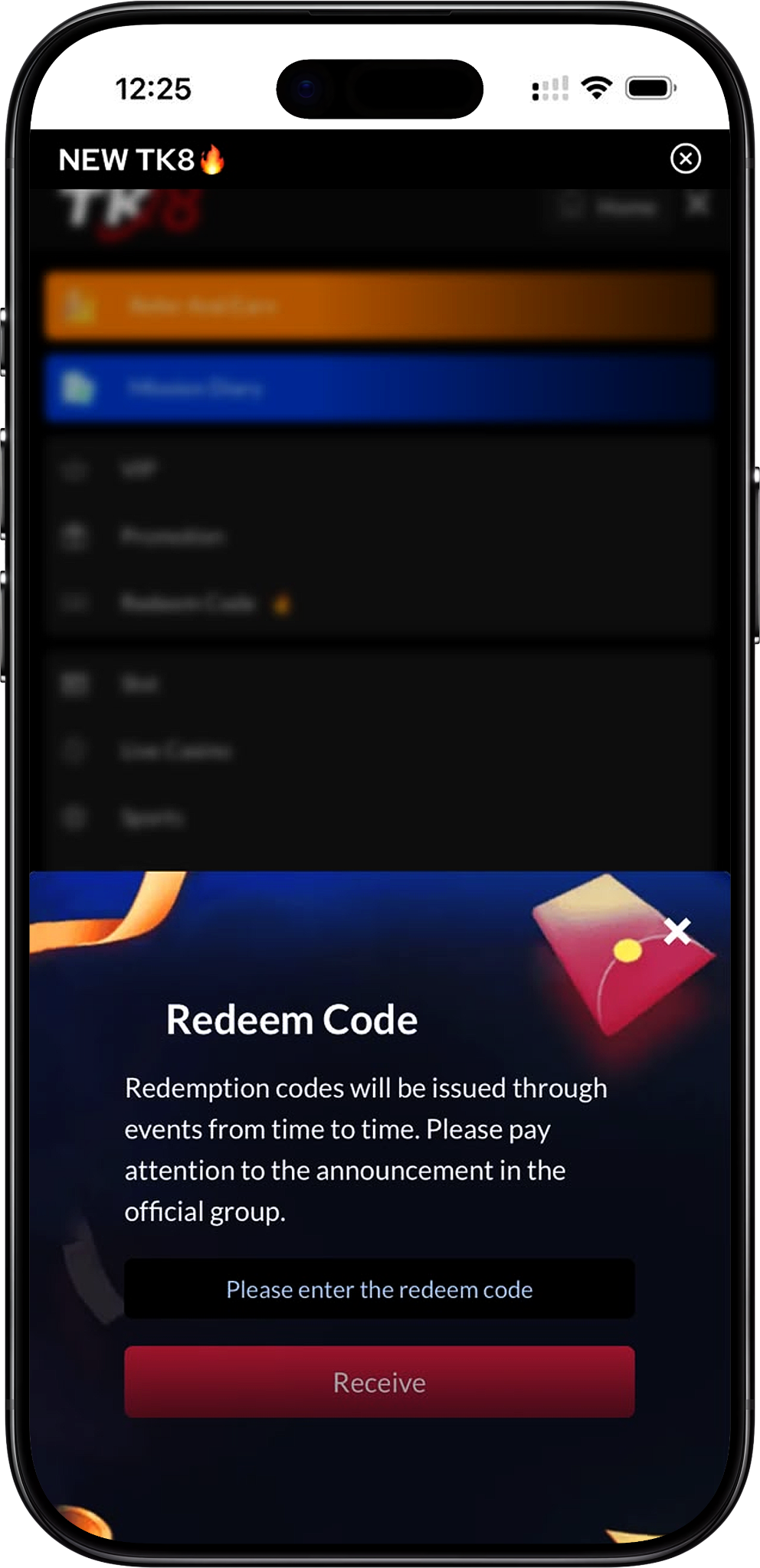
A Code Distributed Through Selected Events
A TK8 Redeem Code is a redemption code that may be issued through platform events from time to time. It is not presented as a permanent or automatically available reward. Members need a valid code connected with an applicable event before using the redemption field.
Redeem Codes Are Different from Standard Promotions
A redemption code is entered manually through the Redeem Code feature, while standard offers can have separate deposit, turnover, rebate or membership requirements. Members looking for current offers can review TK8 Promotion (/en/promotion, internal link) instead of assuming that every promotion requires a code.
Codes May Have Event-Specific Conditions
A code may be associated with a particular campaign, eligibility group or availability period. Members should read the announcement accompanying the code before submitting it because the supplied screen does not indicate that every code works for every account.
Where Redeem Codes Come From
Event Announcements
The supplied Redeem Code interface states that redemption codes will be issued through events from time to time. This means members should rely on the information accompanying the relevant event rather than trying random or guessed codes.
Official Group Announcements
The same interface instructs members to pay attention to announcements in the official group. A code should therefore be checked against the relevant official announcement before it is entered into an account.
Promotion-Related Opportunities
Some events may be presented alongside other promotional activity, but a standard promotion and a redemption-code event should be treated separately unless the applicable announcement connects them. Visit Promotion (/en/promotion, internal link) to review the current promotion categories independently.
How to Redeem a TK8 Code
Step 1: Register an Account if Needed
New members should first complete TK8 Register (/en/register, internal link). Use accurate account information and complete the required registration process before attempting to use member-only account features.
Step 2: Log In to Your Account
Existing members can use TK8 Login (/en/login, internal link) to access the account where the redemption reward is intended to be received. Make sure you are using the correct member account before entering a code.
Step 3: Check the Relevant Event Announcement
Before entering anything, confirm that the redemption code comes from an applicable event or official-group announcement. Check any stated eligibility period or participation requirements so you know whether the code is intended for your account.
Step 4: Open the Redeem Code Page
Go to Redeem Code (/en/redeem-code, internal link) from the member navigation. The redemption interface contains a field labelled for entering the redeem code and a Receive button beneath it.
Step 5: Enter the Redemption Code
Type or paste the code exactly as it was provided in the event announcement. Avoid adding unnecessary spaces or changing characters because even a small difference can prevent the submitted code from matching the issued redemption code.
Step 6: Select Receive
After checking the entered code, select the Receive button to submit it. Do not repeatedly submit the button if the request is still being processed.
Step 7: Check the Result
Review the on-screen response and your relevant account records after submission. If the redemption is successful, verify the reward according to the event instructions instead of assuming a specific reward type or value in advance.
Step 8: Review Help Information if Needed
If the code does not work after you have checked its spelling and event conditions, review FAQs (/en/faqs, internal link) for relevant account guidance. The main naked URL is https://tk8official.com.my.
How to Enter a Redeem Code Correctly
Copy the Code Exactly
Use the code exactly as supplied in the corresponding announcement. Pay particular attention to similar-looking letters, numbers, uppercase or lowercase characters if the issued code distinguishes between them.
Remove Accidental Spaces
When copying a code from a message, check that no space appears before or after the code. Extra characters can cause a valid redemption string to be submitted incorrectly.
Use the Correct Member Account
Sign in to the account that is eligible for the event before redeeming. If you have not yet accessed your account, use Login (/en/login, internal link) before returning to the redemption feature.
Check the Event Period
Redemption codes distributed through temporary events may have specific availability periods. A code that was previously announced may no longer be usable after the associated event has ended.
Check Any Eligibility Requirements
Some events may restrict eligibility according to member status or other stated conditions. Review the actual announcement rather than assuming that possession of a code alone guarantees successful redemption.
What Happens After Selecting Receive
The Code Is Submitted for Validation
Selecting Receive submits the entered redemption code through the account interface. The platform can then determine whether that code is recognised and whether the applicable redemption conditions have been met.
Successful Redemption Depends on the Code
A successful result depends on factors such as code validity, account eligibility and any conditions attached to the event. The supplied interface does not state that entering a code automatically guarantees a reward.
Verify the Reward After Redemption
After a successful submission, check the account area relevant to the announced reward. Depending on the event, the reward mechanism may differ, so members should follow the instructions provided with that specific redemption code.
Check Other Member Reward Services Separately
Redeem Code is one member feature and should not be confused with Rebate (/en/rebate, internal link), VIP (/en/vip, internal link) or other reward systems, which may use their own qualification and distribution rules.
Common Redeem Code Problems
The Code Is Entered Incorrectly
One of the first things to check is whether every character matches the issued code. Re-enter the code carefully and remove any accidental spaces before submitting it again.
The Code May Have Expired
Because redemption codes can be associated with time-limited events, an older code may no longer be available. Check the original event announcement for any stated redemption period.
The Account May Not Be Eligible
A code can be valid while still being limited to qualifying participants. Review the event requirements and confirm that the account meets any stated conditions.
The Code May Already Have Been Used
Event rules can restrict how many times a code or member account can redeem a reward. If a previously accepted code no longer works, check whether the event permits multiple redemptions before trying again.
The Wrong Account Is Logged In
Confirm that you are signed into the intended account. If necessary, return through Home (/en, internal link), confirm your account session and reopen the redemption feature.
The Event Information Is Unclear
Do not guess eligibility or repeatedly enter alternative codes. Review FAQs (/en/faqs, internal link) and the relevant event announcement for the most applicable instructions.
Redeem Codes and TK8 Promotions
Redeem Codes Are Not the Same as Welcome Bonuses
The supplied promotion catalogue includes separate welcome offers such as SLOTS 100% WELCOME BONUS RM 800* (/en/promotion/slots-100-welcome-bonus-rm800, internal link) and LIVE CASINO 50% WELCOME BONUS RM 300* (/en/promotion/live-casino-50-welcome-bonus-rm300, internal link). These offers have their own conditions and should not be treated as redeem-code rewards unless specifically stated.
Rebates Use Separate Qualification Rules
0.5% REBATE SLOTS (/en/promotion/0-5-rebate-slots, internal link) and 1.0% REBATE LIVE CASINO (/en/promotion/1-rebate-live-casino, internal link) are calculated according to their relevant valid-bet conditions rather than simply by entering a redemption code.
Reload Bonuses Have Their Own Mechanics
The 10% UNLIMITED RELOAD BONUS RM200 (/en/promotion/10unlimited-reload-bonus-rm200, internal link) uses qualifying reload deposits, eligible game categories and turnover requirements. It should be reviewed through its dedicated promotion conditions.
VIP Rewards Follow Membership Levels
The BE A TK8 VIP (/en/promotion/be-a-tk8-vip, internal link) offer and the main VIP (/en/vip, internal link) programme use membership levels, Upgrade VIP Points, Cycle Points and tier-specific benefits rather than a general redemption-code mechanism.
Redeem Code Safety Tips
Use Codes from Recognised Announcements
Only enter redemption codes that you can trace to the relevant event or official-group announcement. Avoid relying on unverified messages that promise guaranteed rewards or ask for unrelated account information.
Never Share Your Password or OTP
A redemption code should not require you to disclose your account password, OTP or other private login credentials to another person. Use the normal account interface to submit the code yourself.
Do Not Pay Someone for a Supposed Code
The supplied redemption information describes codes as being issued through events. Be cautious of anyone demanding payment or sensitive account information in exchange for an alleged guaranteed code.
Review Account and Platform Policies
Members can read Terms and Conditions (/en/terms-and-conditions, internal link) and Privacy Policy (/en/privacy-policy, internal link) to understand relevant account and data-handling rules.
Keep Gaming Rewards in Perspective
A promotional or redemption reward should not be treated as guaranteed profit or a reason to increase spending. Review Responsible Gaming (/en/responsible-gaming, internal link) for safer-play information and personal-limit guidance.
TK8 Redeem Code FAQs
What is a TK8 Redeem Code?
It is a redemption code that may be issued through selected events from time to time and entered through the Redeem Code feature to request the associated reward.
Where can I get a redeem code?
The supplied interface states that redemption codes are issued through events and advises members to pay attention to announcements in the official group.
Is there always an active redeem code?
Not necessarily. The wording states that codes are issued through events from time to time, so availability can depend on current event activity.
How do I redeem a code?
Log in, open the Redeem Code feature, enter the issued code exactly as provided and select Receive. Then check the resulting status and follow any event-specific instructions.
What does the Receive button do?
The Receive button submits the entered redemption code for processing through the account interface.
Why is my redeem code not working?
Possible reasons include an incorrect entry, an expired event, an ineligible account, a previously used code or other conditions attached to that particular redemption event.
Can I use the same code more than once?
That depends on the rules attached to the specific event. Do not assume that a successful code can be redeemed repeatedly unless the relevant announcement explicitly allows it.
Can every member use every code?
Not necessarily. Event-specific eligibility can apply, so members should review the conditions accompanying the issued code before attempting redemption.
Is a redeem code the same as a promo code?
The terms can be used differently by individual platforms. On this page, Redeem Code refers specifically to the feature shown for entering codes issued through events and selecting Receive.
Is a redeem code the same as a referral code?
No. A referral code can be associated with account registration or referral activity, while a redemption code is entered into the Redeem Code feature to request an event-related reward. New users can review Register (/en/register, internal link) for registration information.
Do welcome bonuses require a redeem code?
The supplied information does not establish that the listed welcome bonuses require a redemption code. Members should follow the dedicated conditions on each promotion page instead.
Can I redeem a code before logging in?
The redemption feature is associated with a member account, so members should access the intended account through TK8 Login (/en/login, internal link) before attempting redemption.
Where should I check current bonuses?
Visit Promotion (/en/promotion, internal link) to compare the currently supplied welcome bonuses, rebates, reload bonus and VIP offer separately from event redemption codes.
Where can I check my VIP benefits?
Visit VIP (/en/vip, internal link) to review membership levels, Upgrade Bonus, Birthday Bonus, Monthly Bonus, Daily Aid, Upgrade VIP Points and Cycle Points.
Where can I find available games?
Members can browse Games (/en/games, internal link) for Slot, Live Casino, Sports, Fishing, Card Game, Esports, Cockfight and Instant Win categories, or visit Lottery (/en/lottery, internal link) for the separate lottery service.
Where can I manage deposits and withdrawals?
Use Deposit (/en/deposit, internal link) for funding information and Withdrawal (/en/withdrawal, internal link) for the relevant payout process. Redeem Code should not be treated as a substitute for either account service.
Where can I learn more about the platform?
Visit About Us (/en/about-us, internal link), FAQs (/en/faqs, internal link) or Home (/en, internal link) for additional platform information and navigation.
Have a Valid TK8 Redeem Code?
Check the event announcement, confirm that your account is eligible, enter the redemption code exactly as issued and select Receive to submit it.