

TK8 Register Guide for New Users
TK8 Register is a two-stage process for users entering through TKASH. First, create a TKASH account using an account display name, Malaysian phone number and referral information. After gaining access to the TKASH App, open the NEW TK8 service and complete the separate Sign Up form using your mobile number, password and OTP Code. This guide explains the sequence so new users can distinguish between their TKASH account and gaming account registration.
Table of Contents
What You Need Before TK8 Registration
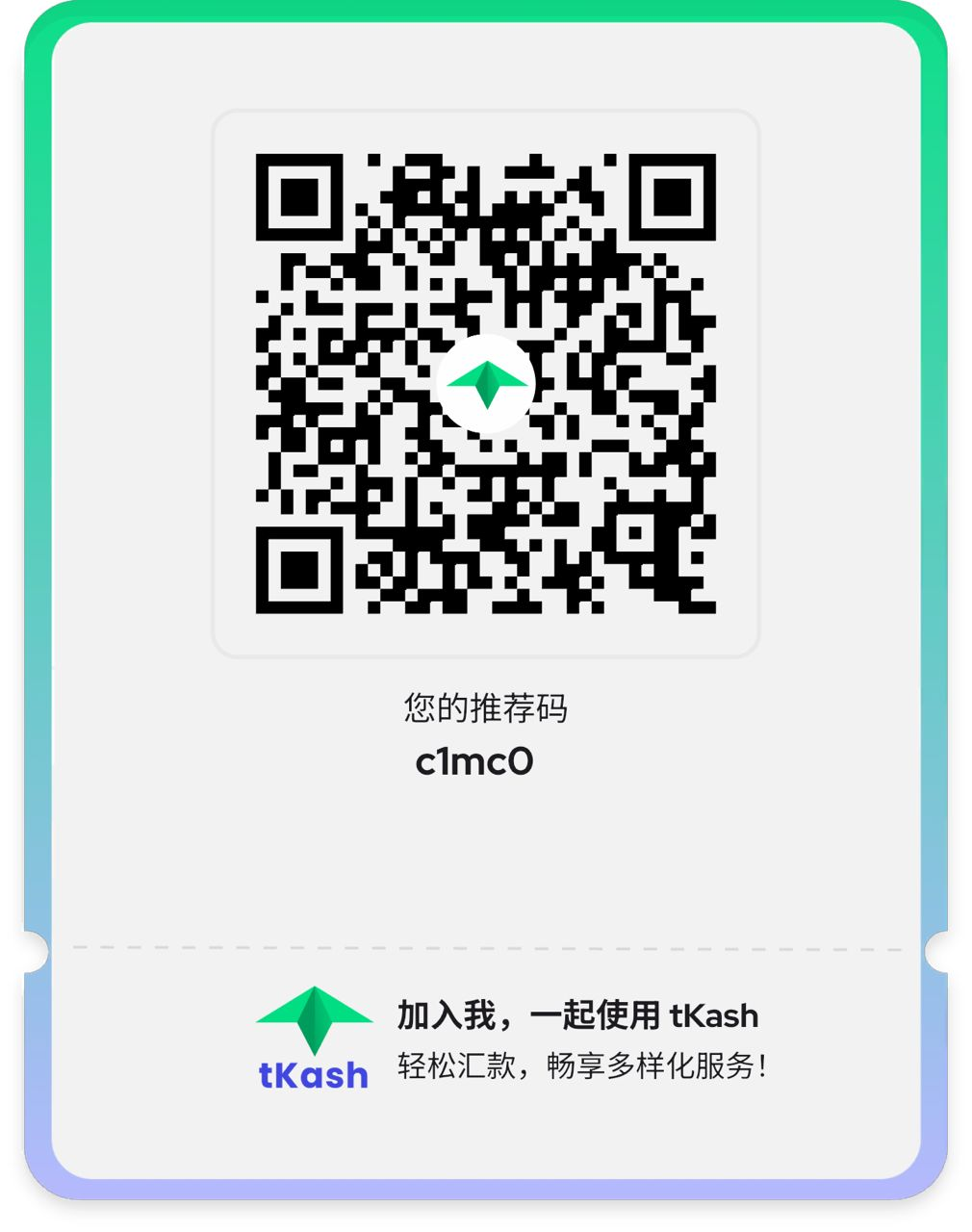
Before starting, prepare an active mobile number that can receive an OTP. Users following the TKASH route should also have access to the TKASH registration process and its app. The supplied registration material shows an account display name, phone number and Referral Code as part of the initial TKASH account setup.
TKASH Account Comes First
The first stage creates the TKASH account used to access its services. Complete TKASH account registration (/en/register, internal link) with the requested display name and phone details. If a Referral Code has been provided, check it carefully before submitting the form rather than entering an unfamiliar code.
Keep Your Mobile Number Available
The later Sign Up screen uses a phone number and OTP Code. Keep the same accessible mobile device nearby so you can receive the verification message promptly. Never disclose an OTP, account password or other private authentication information to another person.
TK8 Register Steps Through TKASH
Step 1. Create Your TKASH Account
Begin with Register through TKASH (/en/register, internal link). Enter the requested account display name and mobile number, review the Referral Code shown or supplied to you, and submit the registration form only after confirming the information is correct.
Step 2. Download the TKASH App
After completing the TKASH account setup, use Download the TKASH App (/en/download, internal link) to obtain the appropriate mobile version. Install the app through the provided download route and avoid unofficial installation files from unknown sources.
Step 3. Log In to the TKASH App
Open the installed application and use TKASH Login (/en/login, internal link) to access the account you created. Successful login takes you to the TKASH home interface, where available services are displayed.
Step 4. Select NEW TK8 from Services
On the TKASH home screen, locate the Services section and select the NEW TK8 icon. This opens the TK8 interface shown in the supplied material. Users who want general platform information can first visit TK8 Home (/en, internal link).
Step 5. Open Sign Up
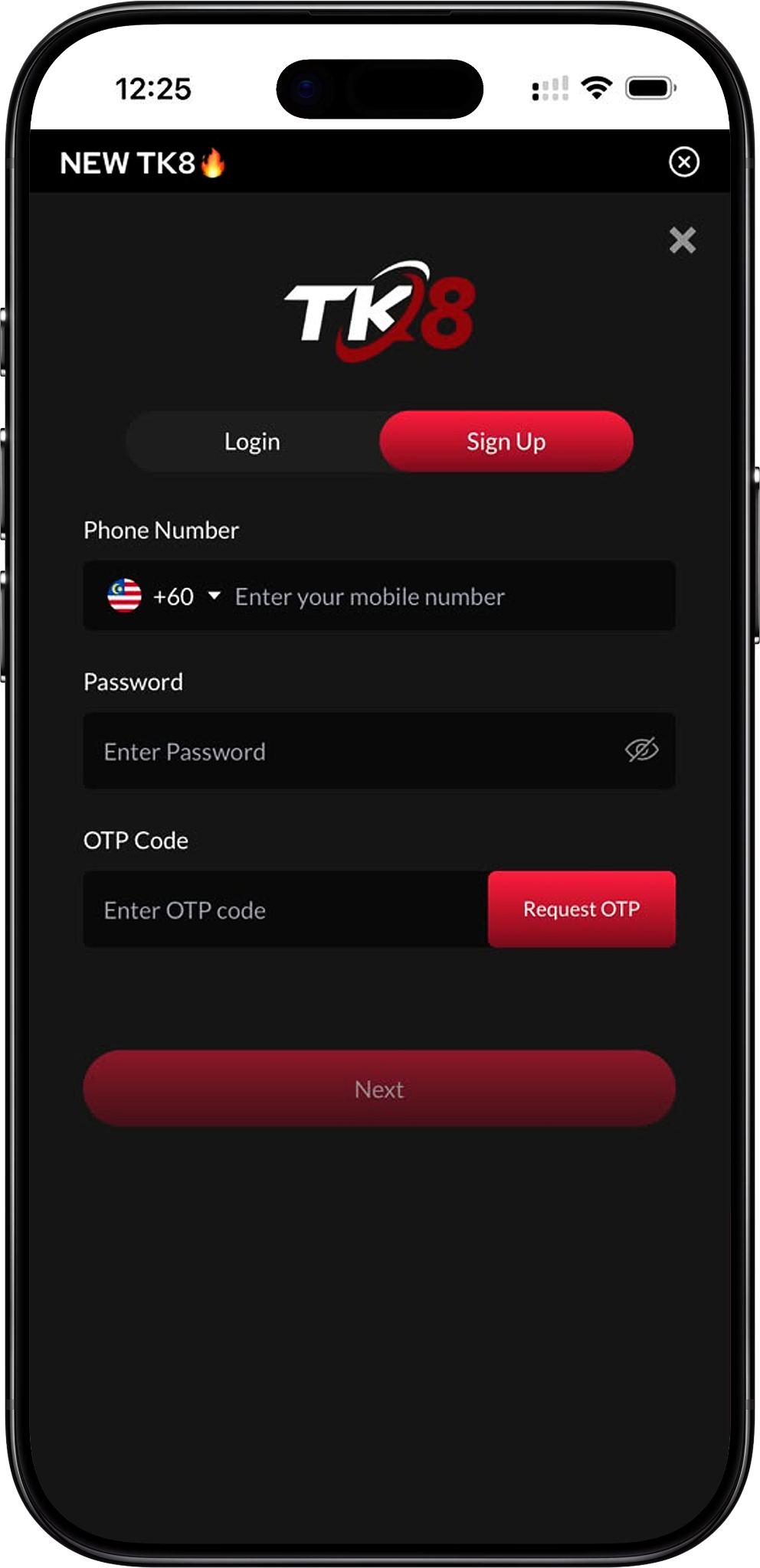
Inside the TK8 interface, choose the Sign Up option instead of Login. The registration screen requests a phone number, password and OTP Code. Existing account holders should use TK8 Login (/en/login, internal link) rather than creating another account unnecessarily.
Step 6. Enter Your Phone Number and Password
Select the correct country code, enter your active mobile number and create a password that is difficult to guess and not reused on unrelated services. Review the number before requesting verification because the OTP will be sent using the contact details entered here.
Step 7. Request and Enter the OTP Code
Select Request OTP, wait for the verification message and enter the received code in the OTP Code field. Do not share the code. Once the required information has been accepted, follow the on-screen Next prompt to continue and complete the account setup.
How the Referral Code and QR Code Work
A Referral Code may be supplied as text or through a QR Code. In the provided TKASH registration material, the referral information is associated with the initial TKASH account creation stage. Users should verify that the displayed referral information corresponds to the invitation they intended to use before completing registration.
Referral Code Entry
If the registration form already displays a Referral Code after entering through an invitation, check it before selecting Register. The supplied QR material displays the referral code “c1mc0”. Because referral information can be invitation-specific, use the code associated with the referral route you actually received rather than assuming one code applies to every registration.
QR Code Registration
A QR Code can provide a convenient entry route when it is supplied by the intended referral source. Scan the code using a compatible device, review the destination and confirm the referral information before continuing. If the QR Code opens an unexpected destination or requests unrelated sensitive information, stop and verify the source first.
How to Complete OTP Verification
OTP verification confirms access to the mobile number entered during Sign Up. Enter the correct country code and phone number, select Request OTP, then use the code received on that device. OTP codes are temporary authentication credentials and should remain private.
If the OTP Does Not Arrive
Check that the country code and mobile number are correct, confirm that the device has network service and allow a short period for message delivery before requesting another code. Repeated requests can make it difficult to identify the latest valid OTP, so follow the instructions shown on the registration screen.
What to Do After Registration
Once registration has been completed, use TK8 Login (/en/login, internal link) for future account access. New users can review TK8 Games (/en/games, internal link), including Slot (/en/games/slot, internal link), Live Casino (/en/games/live-casino, internal link), Sports (/en/games/sports, internal link), Fishing (/en/games/fishing, internal link), Card Game (/en/games/card-game, internal link), Esports (/en/games/esports, internal link), Cockfight (/en/games/cockfight, internal link) and Instant Win (/en/games/instant-win, internal link). Availability may depend on account status and platform conditions.
Review Account and Transaction Information
Before making transactions, read the relevant instructions for Deposit (/en/deposit, internal link) and Withdrawal (/en/withdrawal, internal link). Users interested in available benefits can separately review Promotion (/en/promotion, internal link), VIP (/en/vip, internal link), Redeem Code (/en/redeem-code, internal link) and Rebate (/en/rebate, internal link) instead of assuming every offer automatically applies to a newly registered account.
Registration Help and Responsible Account Use
Registration should be completed with accurate account information and credentials controlled by the account holder. Before using gaming services, review Terms and Conditions (/en/terms-and-conditions, internal link), Privacy Policy (/en/privacy-policy, internal link), Disconnect Policy (/en/disconnect-policy, internal link) and Responsible Gaming (/en/responsible-gaming, internal link). These pages provide important information about platform rules, personal information and account use.
Where to Find More Information
For common account questions, visit TK8 FAQs (/en/faqs, internal link). Users can also read About Us (/en/about-us, internal link) for platform information or review TK8 Agent (/en/agent, internal link) when specifically looking for referral or agent-related information. The main website can also be reached at the single naked URL tk8official.com.my.
TK8 Register FAQs
Do I need a TKASH account before signing up?
Based on the registration flow supplied for this page, yes. The shown process begins with TKASH account registration, followed by downloading and logging in to the TKASH App. From its Services section, users select NEW TK8 and proceed to the separate Sign Up screen.
What information is required for Sign Up?
The supplied Sign Up screen shows fields for a Malaysian phone number, password and OTP Code. The user requests an OTP after entering the mobile details and then follows the on-screen process to continue.
Where is the NEW TK8 icon in TKASH?
After logging in to the TKASH App, look under the Services section on the home screen. The supplied interface shows NEW TK8 as one of the available service icons. Select it to enter the gaming interface and access Login or Sign Up.
What is the Referral Code shown in the supplied registration material?
The supplied TKASH referral QR material displays “c1mc0”. Referral codes can be tied to a particular invitation, so confirm that the code belongs to the referral route you intend to use before registering.
Can I register without receiving an OTP?
The supplied registration interface includes an OTP Code field and Request OTP button, indicating that mobile verification forms part of the shown Sign Up process. Make sure the entered phone number can receive verification messages before continuing.
Should I create another account if I have already registered?
Existing users should generally use the available Login option rather than repeating Sign Up. If you cannot access an existing account, consult the FAQs and account help (/en/faqs, internal link) before attempting another registration.
Complete Your TK8 Registration
Create your TKASH account, access the app and follow the NEW TK8 Sign Up process with your mobile number and OTP verification. Review every detail before submitting your registration.